Cut faster.
Stay in control.
AI video editing for Premiere Pro — cut vertical talking-head videos automatically.
AMBOSS takes the busywork out of editing your vertical (9:16) talking-head videos, right inside Premiere Pro. You review every step and decide what stays.
9:16 talking head
built exactly for it
Premiere Pro
no new tool
You decide
every step reviewable
Mac · Apple Silicon
M1 or newer
The problem
Talking-head videos
eat your time.
Mostly on busywork.
Every video means the same thing: trim pauses, hunt for stumbles, place zooms. By hand, over and over.
That busywork eats the time that should go into story and quality.
Too risky for client work: here every single step has to land.
This is AMBOSS taking exactly that busywork off your hands, right inside Premiere. All that is left for you is checking what stays.
One honest note: the AMBOSS app interface is German-only for now, so the videos and screenshots on this page show German labels.
Layer Engine · live
Watch AMBOSS clean up
your raw footage.
A small simulation: AMBOSS walks through your footage step by step, and you see exactly what happens along the way.
Input
Interview session · 47:23 min of raw footage · 3 takes
Layer processing
Output
—
How AMBOSS works
AI is not perfect.
That's why you always decide.
AI saves you an enormous amount of time — but only if you stay in control. With AMBOSS the AI suggests and you decide. Your style stays yours and the quality stays exactly where it was.
The AI looks at everything.
AMBOSS finds pauses, stumbles and takes that didn't land in your video and suggests what can go.
You review and approve.
You see every suggestion and can adjust or discard it. Nothing lands in your video that you didn't approve.
Premiere stays your tool.
No new software, nothing to relearn. AMBOSS runs right inside Premiere Pro, where you already work.
Speed from the AI. Quality from you.
Everything that makes your video production faster
Six layers.
One system. All inside Premiere.
Raw-Cut
Raw footage becomes a first cut
AMBOSS listens through the audio, finds pauses and dead air and builds a clean base out of it. The tedious first pass is done.
Cleanup
Stumbles and hesitations marked
Finds stumbles, hesitations and repeated attempts and marks them for deletion. No more hunting for them yourself for hours.
Smart Zooms
Zooms in the right places
Places zooms that match the pace and the mood. Your video feels more alive without you setting every single zoom by hand.
J-Cuts
Softer transitions between scenes
Lets the audio of a scene come in slightly early, so the cuts feel softer and more professional. A calm flow instead of hard cuts.
Captions
Subtitles, timed word by word
Subtitles that sit word for word, in ready-made styles for social media. Right inside Premiere, without typing a single one.
Motion Graphics
Graphics that fit the content
Matching graphics and animations straight into your timeline: titles, callouts and visual accents that fit what is being said.
Creative AI on board
Not just cutting.
Designing too.
Beyond the cut, AMBOSS brings creative tools you would otherwise need separate software for — all right inside Premiere, and you approve every single use.
A still image becomes motion.
Turns a still into a short moving clip — for an intro, a transition or a B-roll moment.
Animations from your text.
Describe what you need — AMBOSS builds the matching animation and drops it straight into your timeline.
The right visuals, without searching.
AMBOSS suggests B-roll clips and images that match what is being said right now. You pick.
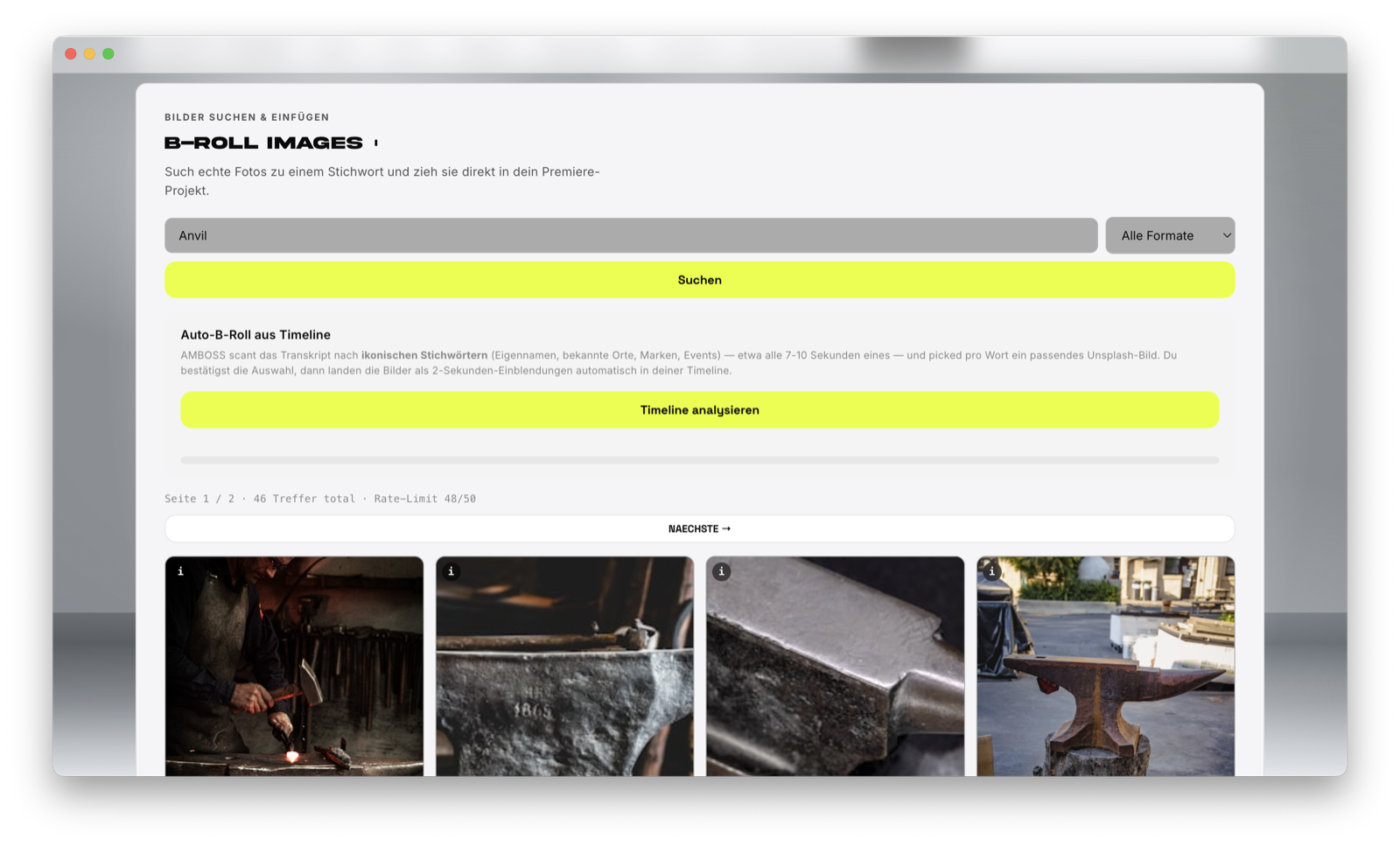
Included in every plan: credits for roughly 10 (Solo) or 25 (Pro) short AI videos per month — depending on clip length. You can top up any time. No AI account of your own needed, everything runs through AMBOSS.
Why not just use another AI tool?
Other AI tools hand you a result.
AMBOSS hands you control.
A finished video comes out, what changed stays unclear
Every step is visible and can be reviewed or adjusted
Your own style disappears in the AI result
Your style stays, you approve every step yourself
Built for everything, really good at nothing
Made specifically for talking-head videos
New tool, new workflow, everything to learn first
Runs right inside Premiere Pro, nothing to relearn
The AI does everything, you have little say
The AI makes it faster, you make the decisions
Being early
pays off.
Full feature set in every plan and unlimited editing — the only difference is how many AI video generations are included per month. Solo & Pro for individual editors, Teams for agencies with several seats and an owner dashboard.
- Full feature set — in every plan
- Rough cut, cleanup, zooms, captions
- Motion design, Transform & B-roll
- Cancel any time
Solo
Editing is unlimited — the difference is AI video generation
Credit card required, nothing is charged during the trial. If you don't cancel before it ends, the Solo plan starts automatically (€49/month). Cancel any time at whop.com/orders.
For everyone who edits their own videos regularly.
- Full feature set — in every plan
- Rough cut, cleanup, zooms, captions
- Motion design, Transform & B-roll
- Cancel any time
Pro
Editing is unlimited — the difference is AI video generation
For power users with high volume — more AI videos every month.
- Full feature set — in every plan
- Rough cut, cleanup, zooms, captions
- Motion design, Transform & B-roll
- Cancel any time
All of the AI runs through AMBOSS — you need no AI account and no keys of your own. Editing is unlimited in every plan; the only difference is the AI video generations included each month (you can top up any time).
After the purchase your access arrives automatically by email. Download the app here.
Requirements: a Mac with Apple Silicon (M1 or newer) and Adobe Premiere Pro (2023 / v23 or newer).
Common questions
Answered briefly.
What do I need to use AMBOSS?
Is there a free trial?
Does AMBOSS replace my editing completely?
Does it run right inside Premiere Pro?
Who is AMBOSS made for?
Less busywork.
More quality.
AMBOSS takes the busywork out of editing, right inside Premiere Pro. You keep control over every step and your style stays yours. For agencies and everyone who wants to make good videos faster.